Skip to content Skip to footer

Tools and reference data

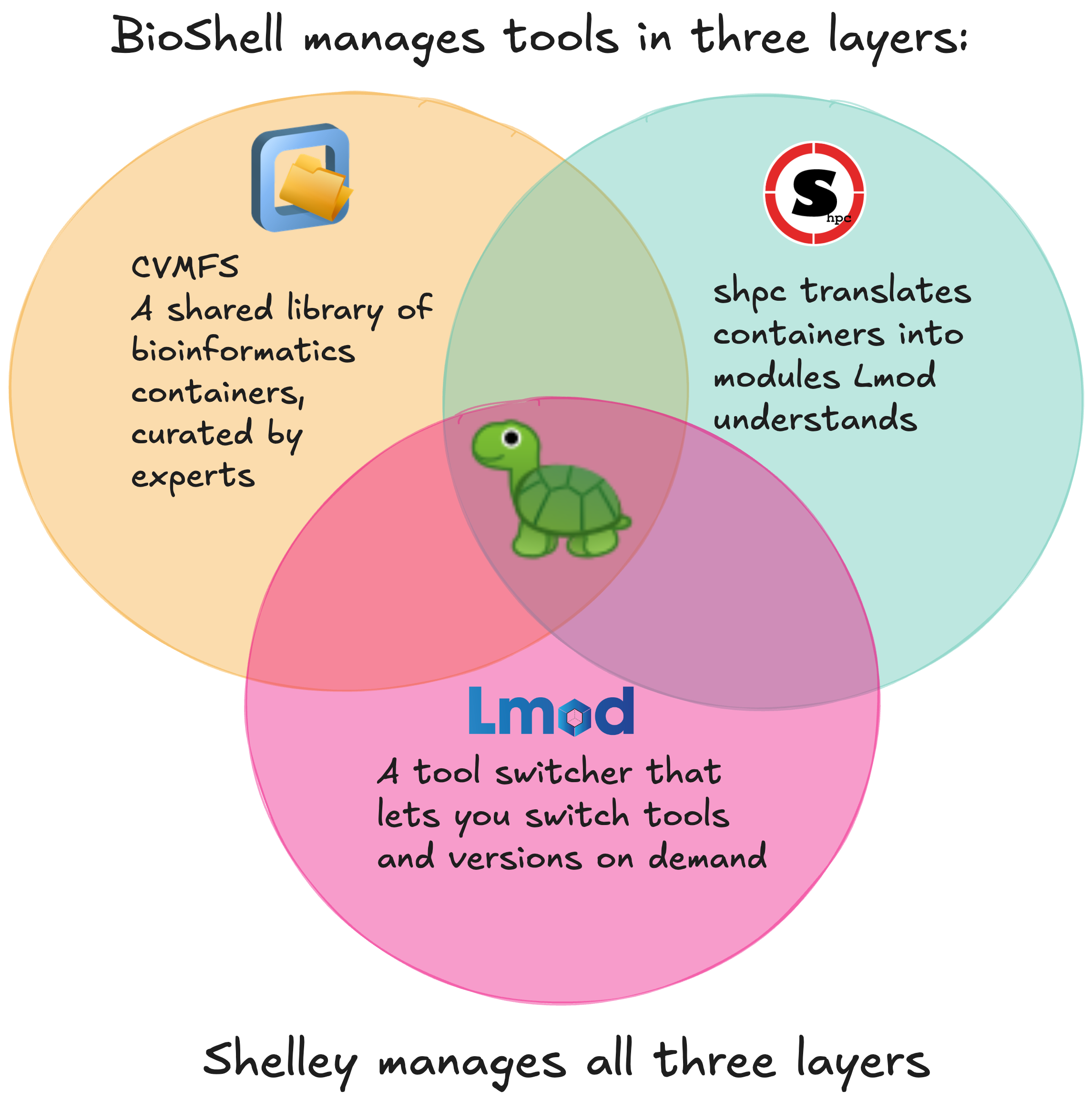
BioShell gives you access to thousands of bioinformatics tools and reference datasets through two underlying systems, CVMFS and sHPC, and a built-in assistant called Shelley-Bio that automates working with both.


How the tooling stack works

CVMFS

CernVM-FS (CVMFS) is a read-only, network-backed file system originally developed at CERN for distributing scientific software at scale. Rather than downloading tools and datasets upfront, CVMFS fetches only what you actually access, on demand, and caches it locally. From your perspective it looks like a regular directory at /cvmfs/: you can ls it, browse it, and point workflows at files inside it. Nothing is stored permanently on the VM itself, and you cannot write to CVMFS: it is a shared, read-only resource.

BioShell mounts three CVMFS repositories automatically:

Repository Contents
singularity.galaxyproject.org 100,000+ containerised tools from BioContainers
data.galaxyproject.org Reference genome builds and pre-built indexes from the Galaxy Project
data.biocommons.aarnet.edu.au [AUTHOR TO SUPPLY — confirm final name and description]

The repositories BioShell connects to are maintained by the BioContainers and Galaxy communities: thousands of tools, kept up to date, versioned, and tested. You get access to all of it without compiling software, managing dependencies, or tracking down container images yourself.

Run the probe command to confirm CVMFS is connected:

cvmfs_config probe

You should see OK for each repository. If a repository shows Failed!, wait a moment and try again. Contact Australian BioCommons support if the problem persists.

Note: The first time you access a path in CVMFS it may take a moment while metadata is fetched and cached. Subsequent access is fast.

sHPC

The containers in CVMFS are encapsulated software components called images. You could run them directly with singularity which is installed on BioShell, but that requires knowing the exact container path for every tool, every time. Singularity-HPC (sHPC) solves this by wrapping containers as standard environment modules, so you can discover and load tools the same way you would on any HPC system:

module load samtools/1.21
samtools --version

sHPC turns containers into clean, versioned modules without requiring you to know how containers work. On BioShell, sHPC should be configured so that installations point at containers already present in CVMFS, so nothing is re-downloaded.

Shelley-Bio

Working with CVMFS paths and sHPC registry recipes by hand is tedious and error-prone, particularly for older tool versions not listed in the standard registry. Shelley-Bio is BioShell’s command-line assistant that automates the entire workflow: it searches the CVMFS BioContainers index, identifies the correct container version, creates any missing registry entries, and runs the sHPC install, all from a single command.


Installing tools

Recommended approach: Start with Shelley-Bio. Use the manual CVMFS/sHPC methods only if you need finer control or are troubleshooting.

Recommended: Shelley-Bio

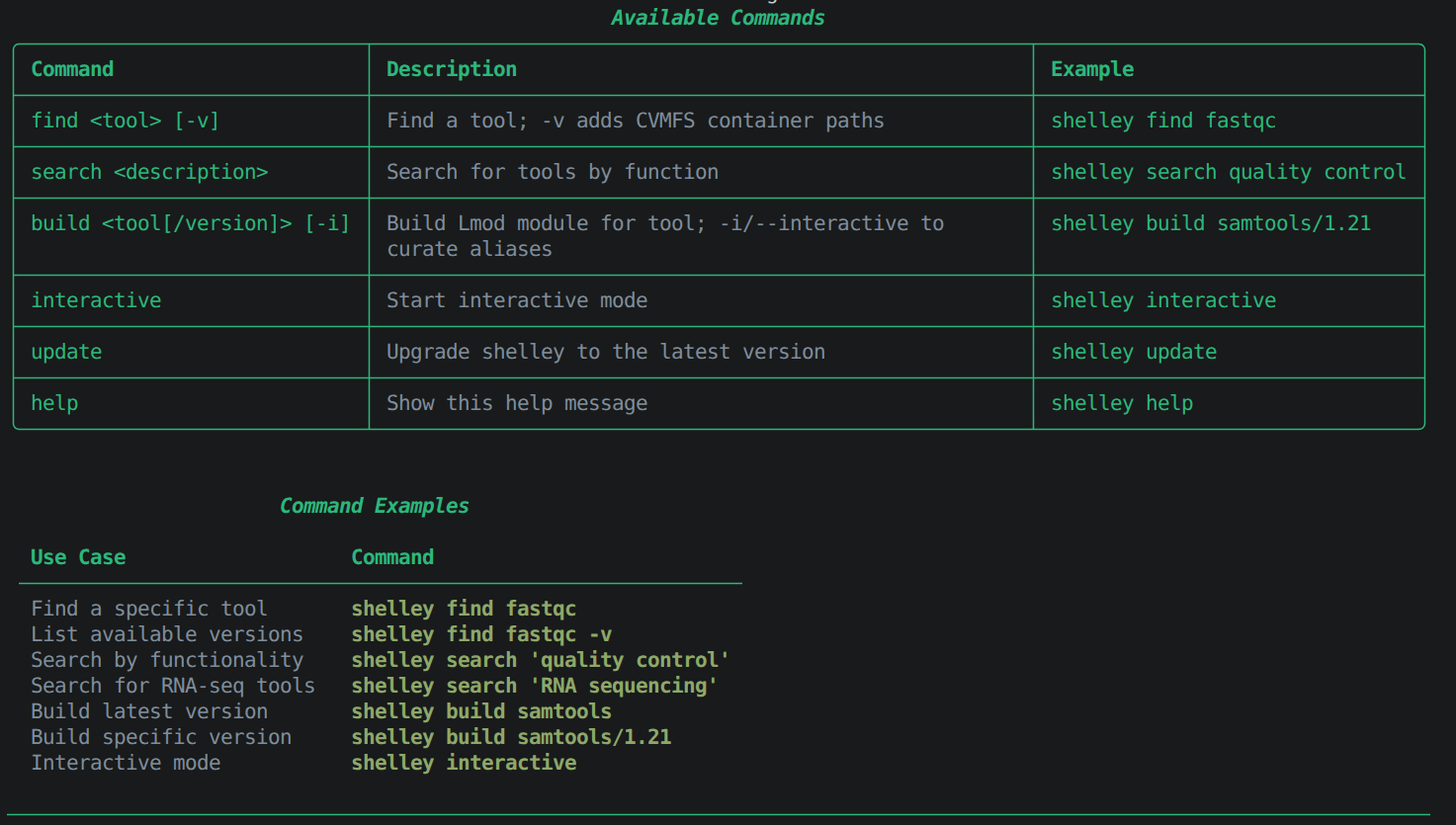
Shelley-Bio indexes over 700 tools and 118,000 container versions from the BioContainers catalogue. You can run it directly from the command line or in interactive mode.

From the command line:

shelley-bio find <tool> # Look up a specific tool by name
shelley-bio search "<function>" # Search by keyword or function
shelley-bio versions <tool> # List all available versions
shelley-bio build <tool> # Install the tool as a loadable module

In interactive mode:

shelley-bio interactive # Launch Shelley-Bio in interactive mode

Example: installing samtools

shelley-bio find samtools
# samtools: Tools for manipulating next-generation sequencing data

shelley-bio versions samtools
# samtools/1.21
# samtools/1.20
# samtools/1.19.2
# ...

shelley-bio build samtools/1.21
# Installing samtools/1.21 from CVMFS...
# Module samtools/1.21 was created.

Fig 3. Using shelley-bio build samtools/1.21 to install a tool module.

Tip: Use shelley-bio search when you know what you want to do but not the tool name. For example, shelley-bio search "variant calling" returns tools relevant to that task.

Why Shelley-Bio over manual sHPC?

The manual sHPC method requires you to load the module, search the registry, identify the correct entry, check available versions, construct the install command with the right CVMFS path and flags, then load the result. If the version you need is not in the registry (common for anything older than the latest release), you also need to check CVMFS directly for the image, compute its checksum, fetch the registry YAML, edit it to add the missing version, create and register a local registry, ensure it takes precedence, then run the install.

With Shelley-Bio, regardless of whether the version is in the sHPC registry or not it handles the registry check, CVMFS path resolution, local entry creation, and the sHPC installation.

shelley-bio build samtools/1.20

The result is identical: a working module load command, without requiring you to know how the underlying machinery works.

Tip: If Shelley-Bio cannot find a tool, fall back to the manual sHPC method below.

Advanced: manual installation

Using sHPC directly

If Shelley-Bio cannot find what you need, or you prefer direct sHPC control, use the steps below. This example uses plink throughout.

Load sHPC:

module load shpc

Search for a tool and view versions:

shpc show -f plink
shpc show quay.io/biocontainers/plink

Verify container path on CVMFS:

ls /cvmfs/singularity.galaxyproject.org/all/plink*

Install a module directly from CVMFS:

shpc install quay.io/biocontainers/plink:1.90b7.7--h18e278d_1 \
  /cvmfs/singularity.galaxyproject.org/all/plink:1.90b7.7--h18e278d_1 \
  --keep-path

The --keep-path flag tells sHPC to use the container already present in CVMFS rather than downloading a fresh copy. The tag numbers must match.

Load and use the module:

module use ~/shpc/modules
module load quay.io/biocontainers/plink/1.90b7.7--h18e278d_1
plink --version

Or run the container directly without a module:

singularity exec \
  /cvmfs/singularity.galaxyproject.org/all/plink:1.90b7.7--h18e278d_1 \
  plink --version

For full documentation see the sHPC user guide.

Installing older or unlisted versions

Some older tool versions exist in CVMFS but are not listed in the default sHPC registry. Shelley-Bio handles this automatically, but if you need to do it manually, follow these steps.

1. Check CVMFS for the version:

ls /cvmfs/singularity.galaxyproject.org/all/plink:1.90b4*

2. Get its checksum:

sha256sum /cvmfs/singularity.galaxyproject.org/all/plink:1.90b4--h0a6d026_2

3. Create a local registry entry:

sudo mkdir -p /apps/local/quay.io/biocontainers/plink

# Fetch the existing remote recipe as a base
curl -fsSL \
  https://raw.githubusercontent.com/singularityhub/shpc-registry/main/quay.io/biocontainers/plink/container.yaml \
  -o /apps/local/quay.io/biocontainers/plink/container.yaml

# Edit the YAML to add the missing version tag and its checksum

4. Register your local registry:

sudo shpc config add registry /apps/local

Verify your local registry appears first (it must take precedence over the remote registry):

shpc config get registry
# ['/apps/local', 'https://github.com/singularityhub/shpc-registry']

5. Install from CVMFS:

sudo shpc install quay.io/biocontainers/plink:1.90b4--h0a6d026_2 \
  /cvmfs/singularity.galaxyproject.org/all/plink:1.90b4--h0a6d026_2 \
  --keep-path

Tip: If Shelley-Bio recognises the container path but the version is not in the registry, shelley-bio build handles the local registry creation automatically.


Loading modules

Once Shelley-Bio or sHPC has installed a module, load it with:

module load <tool>/<version>

Verify the tool is ready:

<tool> --version

Reference datasets

CVMFS also provides access to reference genome builds and pre-built indexes from the Galaxy Project. You can browse the full repository at datacache.galaxyproject.org before triggering any downloads on the VM. On BioShell, the same content is available at:

ls /cvmfs/data.galaxyproject.org/byhand/
ls /cvmfs/data.galaxyproject.org/managed/
Directory Contents
/managed Datasets generated with Galaxy Data Manager tools. Organised by index type, then genome build.
/byhand Older, manually curated datasets. Organised by genome build, then index type.

To use a reference file in your analysis, pass its absolute path directly to your tool or pipeline config. For example, the human CHM13 T2T v2.0 FASTA file is at:

/cvmfs/data.galaxyproject.org/byhand/CHM13_T2T_v2.0/seq/CHM13_T2T_v2.0.fa

The T2T genome directory also includes pre-built indexes for common aligners:

ls /cvmfs/data.galaxyproject.org/byhand/CHM13_T2T_v2.0/
# bowtie2_index/  bwa_mem_index/  bwameth_index/  hisat2_index/  len/  rnastar/  seq/

Note: The reference datasets available through CVMFS are maintained by the Galaxy Project and may not be comprehensive. This is not a replacement for your institution’s primary data access methods.


Troubleshooting

CVMFS probe fails for a repository

The repository may be temporarily unavailable. Wait a moment and run cvmfs_config probe again. Contact Australian BioCommons support if the problem persists.

Module appears in module avail but will not load

Check that both shpc and singularity are loaded:

module list

sHPC requires Singularity to execute containers.

Shelley-Bio cannot find a tool

Try search with different keywords, for example shelley-bio search "alignment" instead of a specific tool name. If the container exists in CVMFS but Shelley-Bio does not index it, fall back to the manual sHPC method above.


Further reading